Create and Restore Database Backups
How do I create a database backup?
A backup of a database can be created using various tools. Many tools that allow you to access the database, such as phpMyAdmin or MySQL Workbench, also offer the option of backing up the database or individual tables. If you use PostgreSQL, you can create a backup with pgAdmin. In addition to these tools, your website host should also create regular backups of the database, ideally on a daily basis.
In addition to the methods just mentioned, Admidio offers another way to quickly and easily create a backup of your MariaDB or MySQL database. It is particularly advisable to create such a backup before updating Admidio.
- To do this, log in as administrator to your Admidio installation.
- Now select the Preferences menu item and then the Information tab.
- Here, click on the Download database backup button.
- A backup of all Admidio tables and data in the database will now be created.
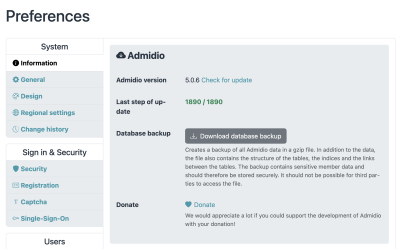
- The created file will be zipped and saved in the selected folder on your computer.

Now, all data (user data, role permissions, role memberships, guestbook messages, etc.) from Admidio are secured. Photos, downloads and backups are not affected by this assurance. These you should additionally back up with your FTP program by loading the folder adm_my_files on your computer! The Admidio program files must be backed up when you have made there own customizations. All program files older Admidio versions can be downloaded from Sourceforge.
How do I set a database backup restore ?
If you want to import the database on another server, or something went wrong with an Admidio update, or data is lost by an error, a backup needs to be restored. The method described here refers to the restore from a backup that was created with Admidio. But it will also work with all other backups, providing a pure SQL file as backup.
- First, obtain the latest backup file. This should be stored in a secure location on your computer or on a backup storage device.
- The file is packed and must be decompressed with a corresponding GZip-Program.
- Next, you should now delete all existing Admidio tables in the database with an appropriate program (in this documentation phpMyAdmin). For this you mark the appropriate tables and choose entry Delete.
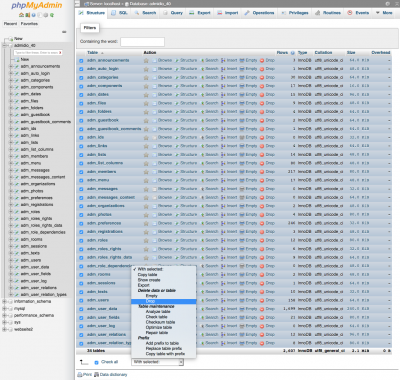
- In the next step you have to disable the setting Enable foreign key checks.
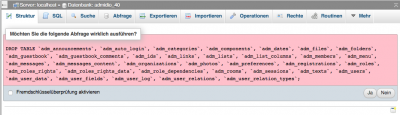
- Now the previous tables are deleted and you can select the menu item Import.
- There you choose the unpacked backup file and start the import. You do not have to change any other settings in the dialog.

- Now, all data should be restored back to the state of the backup.